Discover what social media analytics means and how it benefits businesses, and explore different types of analytics reports plus tools to boost your strategy.
Developing a social media plan involves setting clear goals and objectives for your marketing efforts. But how can you be sure you're on track if you’re not monitoring your social media analytics, metrics, and performance?
Knowing if you’re truly achieving your targets is impossible without monitoring these key insights.
Social media management and analytics play an important role in demonstrating return on investment (ROI) and guiding data-driven business decisions.
Let’s dive into the different metrics and analytics that you should look out for when analyzing your social media success.
Social media analytics report types and examples
Social media analytics report help you track your KPIs (key performance indicators) to ensure your social media activities meet your business goals.
Here are some of the most common reports that should be in your social media analytics dashboard:
Audience analytics report
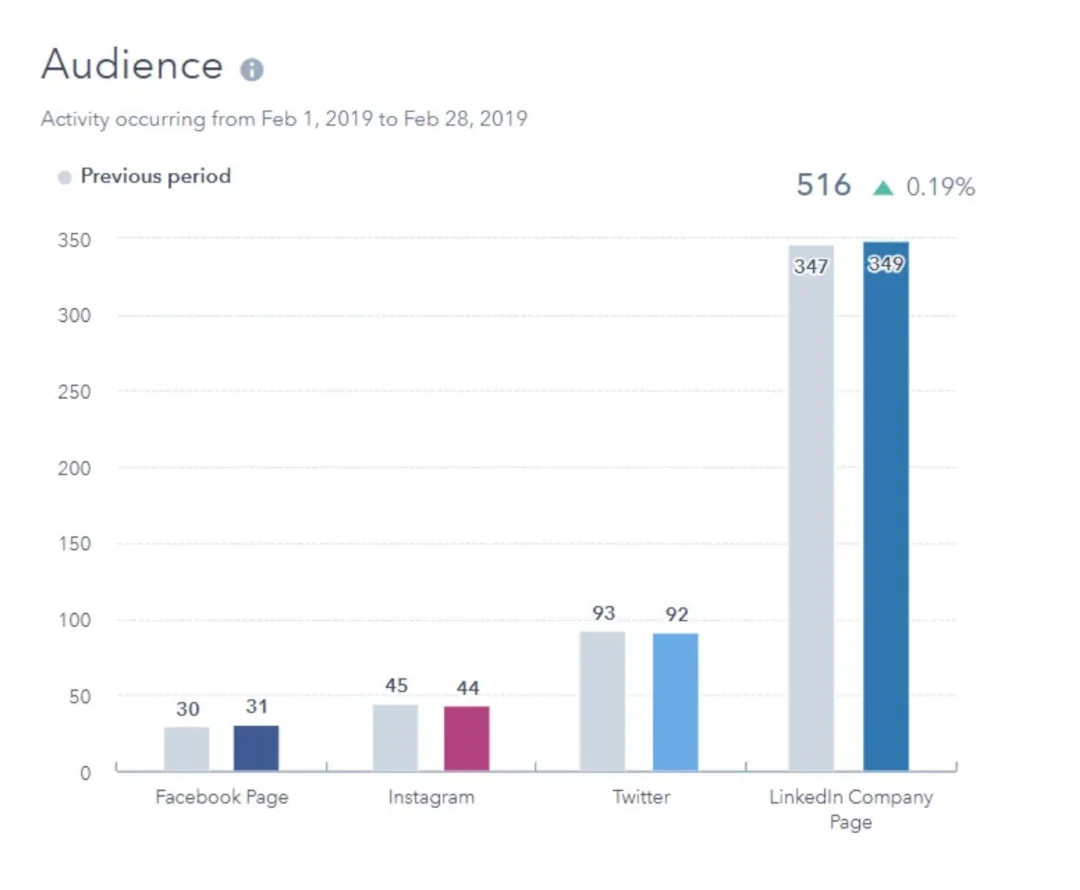
The audience analytics report shows you data points about how many followers you have on each of your social media accounts and compares it to the number of followers you had before.
This report helps you:
- Track your audience growth over time
- Get a clear view of how well your social media strategy is attracting and retaining followers
- Adjust your approach to continue building a strong and engaged online community
Interactions analytics report
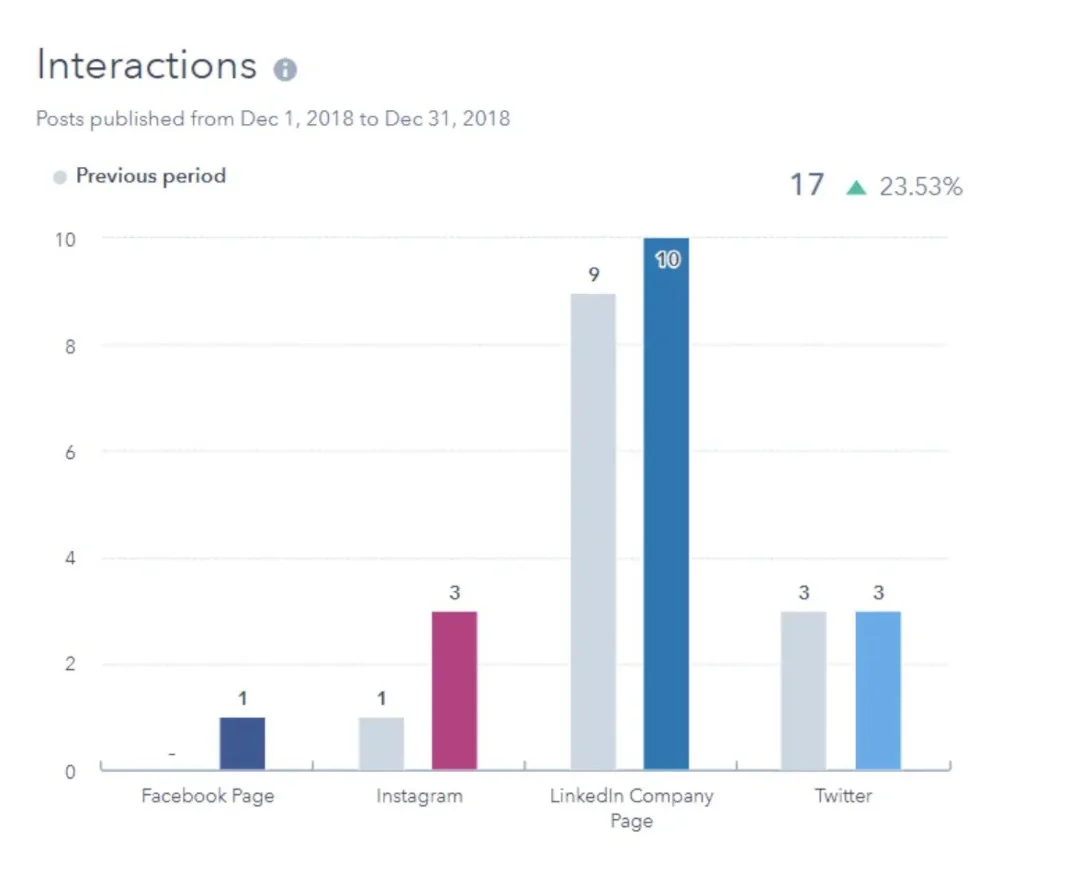
The interactions analytics report clearly shows how people are engaging with your social media ads and posts.
For instance, imagine having a device that records how people react to everything you say at a party. Interaction analytics report does the same for your social media—it helps you understand which posts your audience is reacting to and why. Essentially, it highlights the "conversations" that grab the most attention.
Your interactions analytics report includes the following:
- Likes
- Reactions
- Comments
- Shares
Sessions analytics report
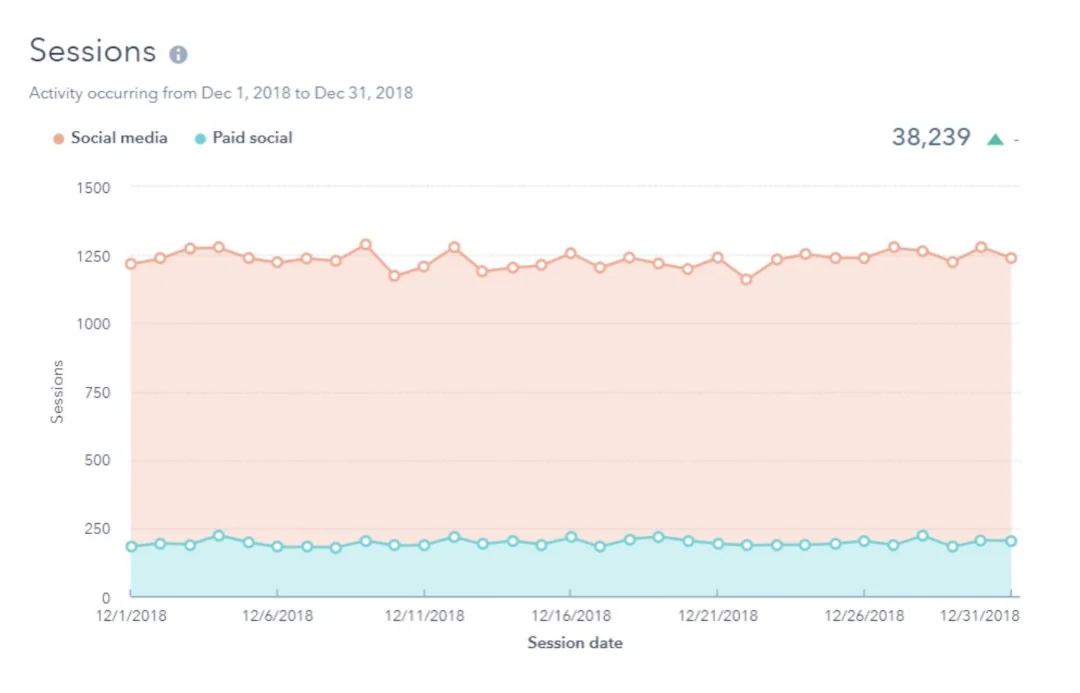
Sessions are a series of user actions on a website/app during a specific period. This social analytics report shows you the following:
- How many visits to your website came from social media networks
- How effective your marketing efforts are at driving traffic to your site
- Which social media channels are bringing in the most visitors
By analyzing this report, you will be able to adjust your approach to boost site traffic even more.
Clicks analytics report
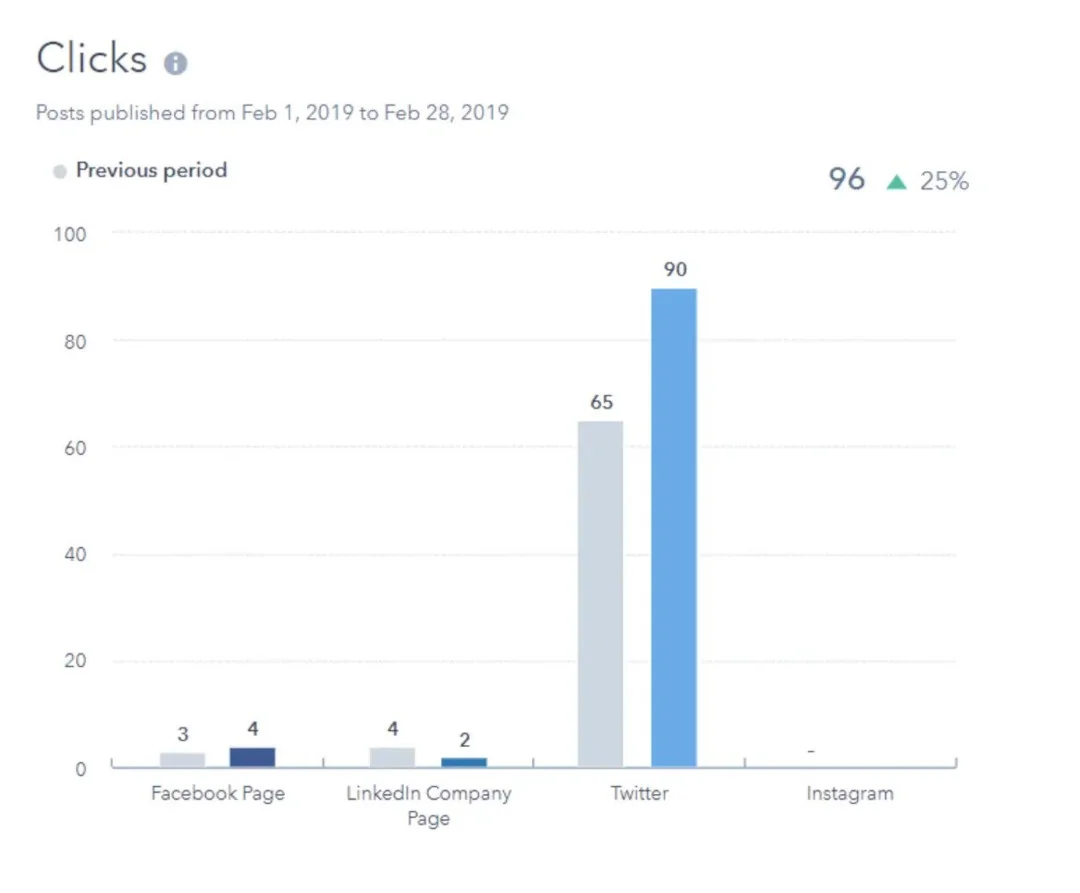
The clicks report reveals how often people have clicked on your social media posts. This report provides a clear view of how effectively your posts are driving interest and engagement.
By examining the number of clicks, you can:
- Discover which posts attract the most clicks
- See what types of content are attracting your audience's attention
- Use insights to adjust and improve your social media content strategy for better results
Impressions analytics report
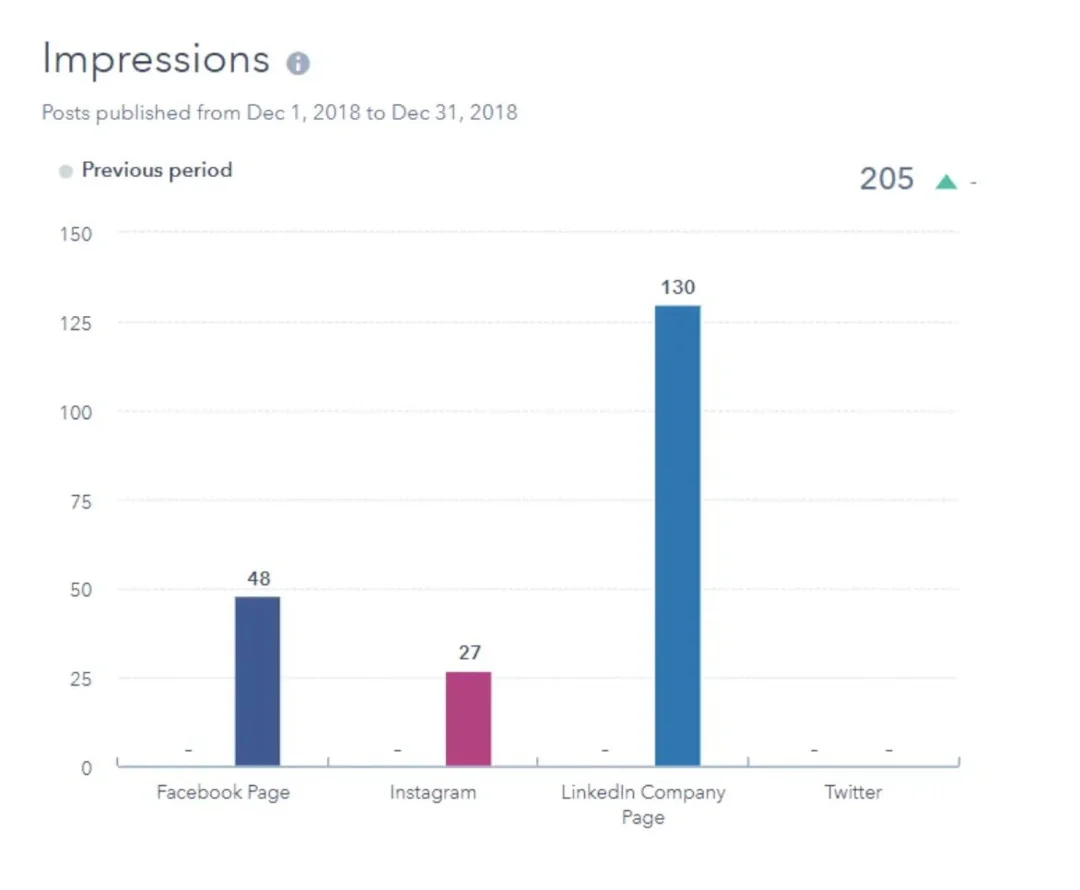
The impressions report shows how often your posts or ads have been viewed on X (Twitter), Facebook, and Instagram. It gives you critical insights into your content's visibility and reach.
By analyzing it, you can:
- See how frequently your posts appear in front of your audience
- Understand the extent of your content's exposure across multiple social media platforms
- Make decisions based on data analysis to boost your content’s visibility and effectiveness
The 4 best social media analytics tools
Here’s a list of the top social media analytics tools for your marketing campaigns.
1. Meta Business Suite
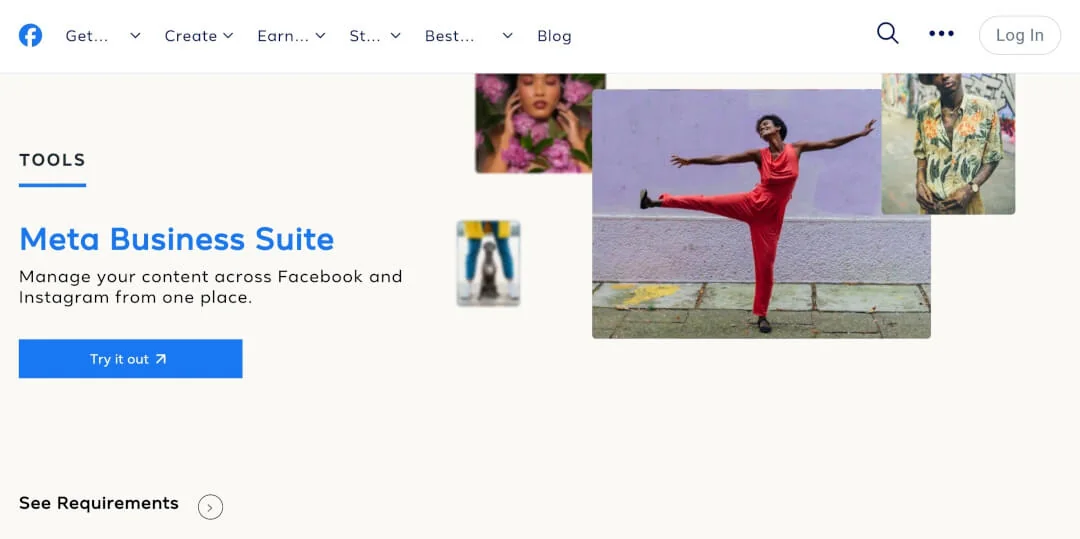
Meta Business Suite (previously called Facebook Analytics) is a free tool for managing your Facebook Page and Instagram business accounts in one place. It's designed to help you save time and improve your social media marketing.
Why should you use it?
- Access key metrics and deeper insights from both Facebook and Instagram platforms
- Quickly respond to comments and messages from both platforms in one place
- Understand what content performs best and tweak your social media marketing strategy accordingly
- Create and manage Facebook and Instagram ads without switching between tools
How to get started?
To use Meta Business Suite, you need either a Facebook Business Page or an Instagram business account. If you don't have one yet, now's the perfect time to set it up!
Here’s how you can do it:
- Visit business.facebook.com
- Log in with your Facebook account
- Follow the steps to create a business account
- Connect your Facebook Page and Instagram business profile
2. Google Analytics
Google Analytics is a free tool from Google that provides detailed insights into your website's traffic and user behavior. It's a powerful resource for businesses of all sizes looking to improve their online presence.
Why should you use it?
- Identify which pages perform well and which need work
- See which social channels drive the most valuable traffic
- Set up goals to track important user actions on your site
- Use audience insights to create content that resonates with your visitors
- Base your website and marketing strategies on real user data
How to get started?
To use Google Analytics effectively, you'll need to invest some time in learning the platform and regularly reviewing your social media data.
But before that, here’s how you can set it up:
- Create a Google Analytics account
- Set up Google Tag Manager on your website
- Create an Analytics property and add the tracking code to your site
- Set up goals to track important conversions
- Link your account to Google Search Console for more insights
3. TikTok analytics
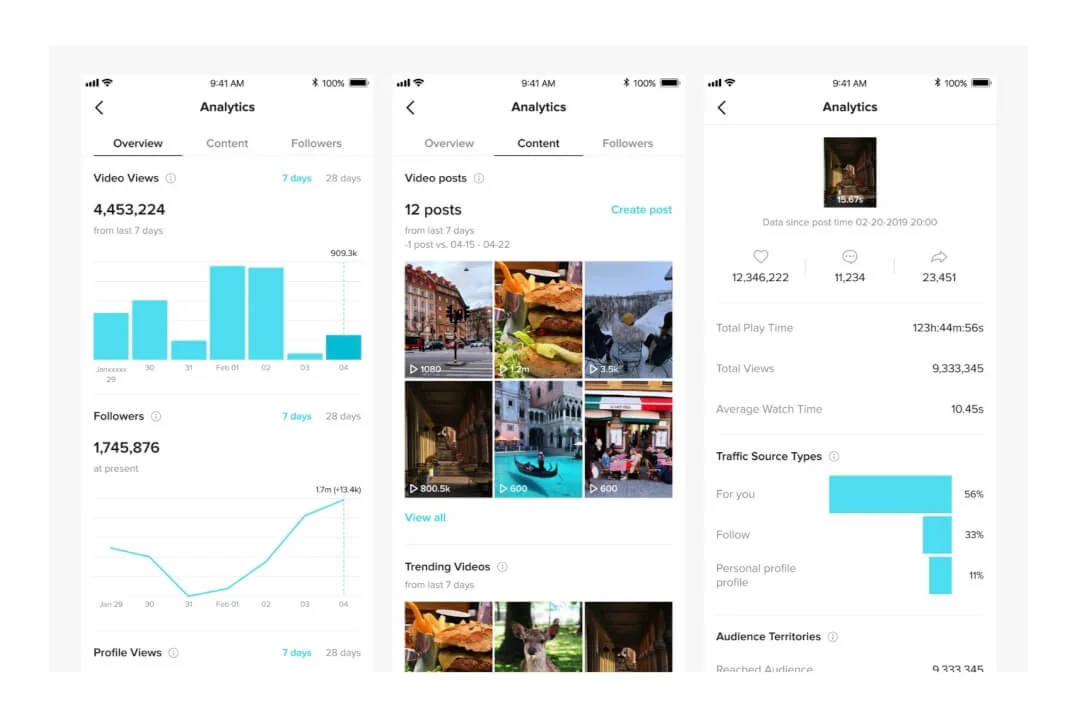
TikTok analytics is a tool built into TikTok business accounts. It helps you refine your content strategy by understanding your performance on the platform and your audience's behavior by tracking relevant social conversations.
Why should you use it?
- Learn what videos resonate with your audience
- Find out when your social media audience is most active
- Use data for social listening and tailor your content for your audience accordingly
How to get started?
To use TikTok analytics, your account must have at least 100 followers and some video content posted in the last 28 days.
Once you’ve done that, follow these steps:
- If you haven't already, switch to a TikTok Business account (from your personal profile)
- On mobile: Go to your profile > Settings and privacy > Creator tools > Analytics
- On desktop: Visit tiktok.com/analytics and log in
4. X (Twitter) analytics
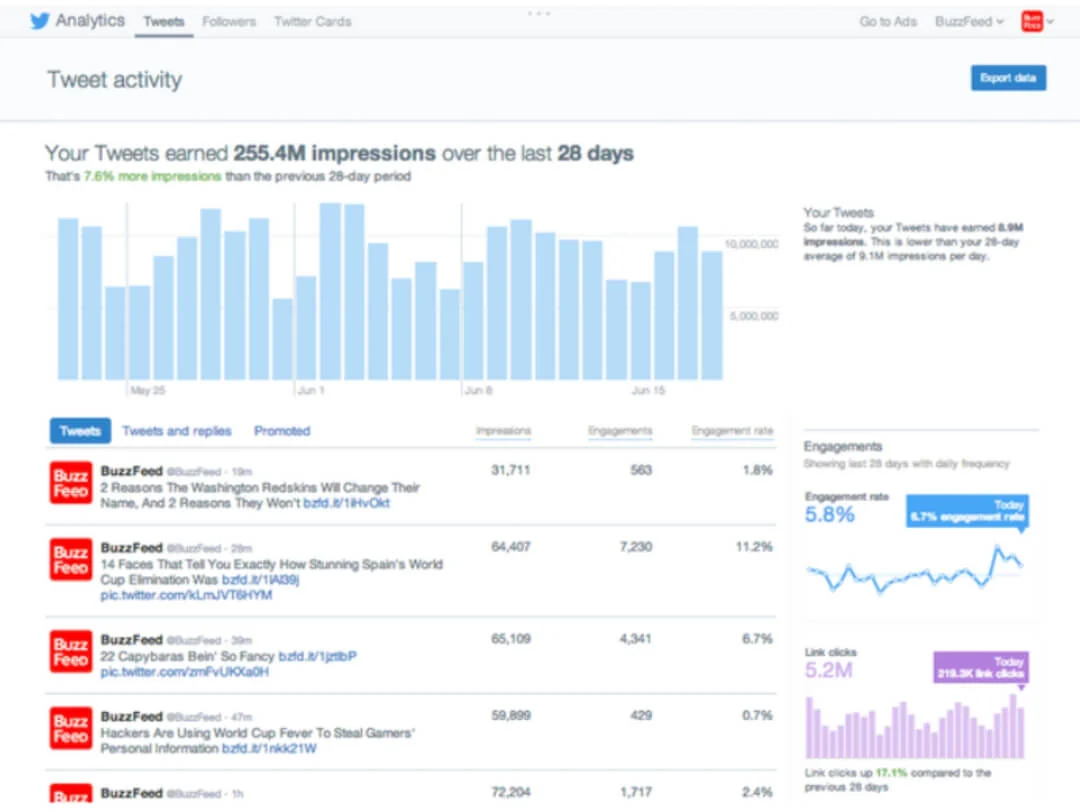
X analytics is a built-in tool that helps you measure and improve your X strategy. It's available to all X users and provides valuable insights into your account's performance.
Why should you use it?
- Find out when your tweets get the most engagement
- See which tweets resonate with your audience and create more of what works
- Use audience insights to create content that appeals to your followers' interests
- Track your follower count and engagement rates to gauge your account's progress
- Use conversion tracking to show how X impacts your business goals
How to get started?
Your account must be at least 14 days old to use X analytics. After that, the setup process is pretty simple:
- Go to account analytics
- Sign in with your X account
- Click "Get Started" if it's your first time
- Explore the different tabs to access various metrics
Conclusion
Social media analytics provide invaluable insights into your audience, content performance, and overall strategy effectiveness across various platforms. By regularly analyzing this data, you can enhance your social media presence and engage your audience more effectively.
While each platform offers its native analytics tools, managing ads across multiple social media platforms can be time-consuming and overwhelming. This is where Madgicx's One-Click Report solution comes in handy. How?
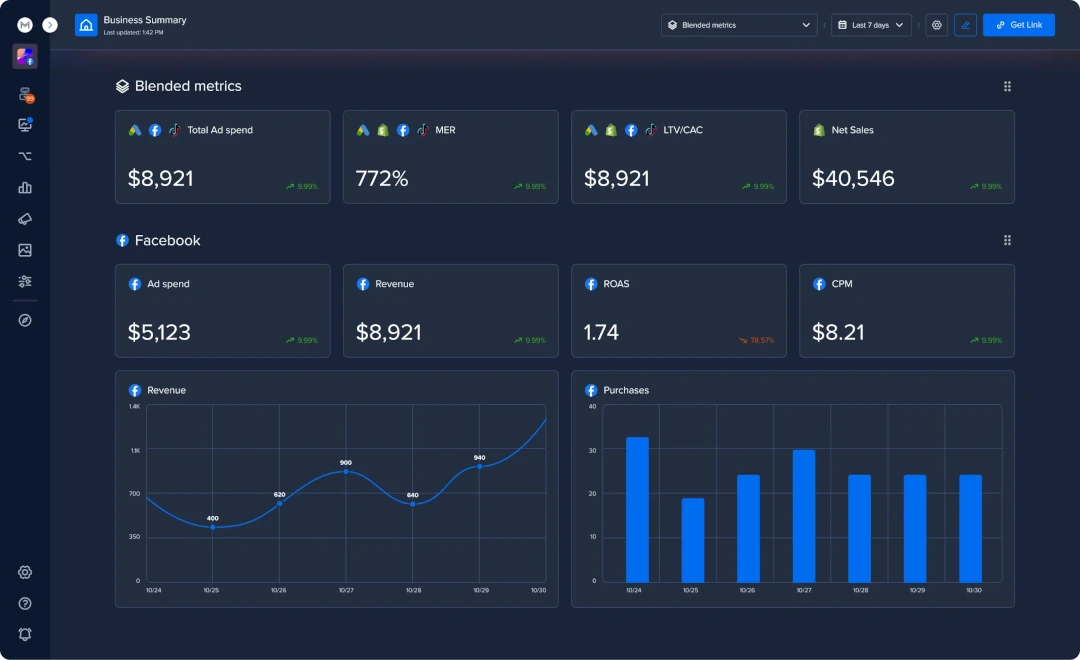
- It consolidates ad data from Meta, Google Ads, GA4, TikTok, Shopify, and Klaviyo into a single, user-friendly dashboard.
- With features like real-time monitoring of crucial ecommerce KPIs, customizable reports, and templates created by top marketers, One-Click Report simplifies the complexities of tracking various social media ad analytics.
Whether you're tracking returns on your ads, monitoring net profit, or managing multiple client accounts, this tool provides the comprehensive insights you need to make data-driven decisions. So sign up for a free trial today!