Can you turn off comments on Facebook ads? Learn about Meta’s latest updates, why comments are essential for your ads, and how to manage them effectively.
If you've ever launched a Facebook ad campaign, you've probably seen the wild west of ad comments—and maybe even wished to shield your brand from the chaos. From enthusiastic supporters to harsh critics (and the occasional spam bot selling Ray-Ban sunglasses)—Facebook ad comments can be a mixed bag. If you are searching how to turn off comments on Meta ads, this guide shows what Meta allows today.
But here's the million-dollar question: Can you turn off commenting on Facebook ads in 2027?
Let's dive into this topic headfirst and explore whether it's possible or even a good idea in the first place.
Facebook ad comments keeping you up at night? Let Madgicx’s AI Marketer analyze your comments, hide negative ones, highlight questions that need answers, and optimize your entire ad strategy—all while you focus on growing your business.
Why you shouldn't turn off comments on Facebook ads
Before we tackle the how, let's address the why—or rather, why not. While the knee-jerk reaction to negative comments might be "make the problem disappear," there are several compelling reasons to keep your comment section alive and kicking:
1. Social proof is marketing gold
Positive comments on your ads are free testimonials. When potential customers see others praising your product or service, it builds trust far more effectively than any marketing copy ever could. In fact, 70% of consumers trust recommendations from people they don't even know over branded content.
Think about it—would you rather buy from a brand with 50 glowing comments or one with a mysteriously empty comment section? That’s the bandwagon effect—people trust what others already love.
That’s why we put together a blog to help you boost your Facebook ads' social proof and turn it into a marketing advantage.
2. Engagement boosts ad performance
Facebook's algorithm loves engagement. Comments, shares, and reactions all signal to Facebook that your ad is resonating with viewers, leading to lower cost per click, extended reach, and higher relevance scores.
You get more bang for your advertising buck when you encourage healthy engagement. And in 2027, when ad costs continue to climb, that's not something to sneeze at.
Not sure which numbers to watch? See our guide to metrics for engagement.
🛎️ Want more tips on how to increase your Facebook engagement? Our article covers why engagement metrics matter, how to calculate your engagement rate, and strategies to boost it for better results.
3. Customer feedback is invaluable
Those comments—even the critical ones—are a goldmine of customer intelligence. They provide real-time feedback about:
✔️ What's working in your messaging
⚠️ Product features that need improvement
😔 Customer pain points you hadn't considered
❓ Questions that could inform your FAQ or future content
Essentially, silencing this feedback channel means missing insights that could shape your product development and Facebook marketing strategy.
Replying fast is easier with a Meta AI comment responder.
4. Some might see it as deceptive
Turning off comments on Facebook ads might seem like a quick fix for managing negativity, but it can also raise red flags for your audience. When people notice that a brand isn’t allowing public feedback, they may assume there’s something to hide—whether that’s terrible reviews, unanswered complaints, or a lack of confidence in the product.
Why you shouldn't turn off comments on Facebook ads
Hang on tight for the good news.
Meta recently rolled out a new feature that lets advertisers disable comments on Facebook ads (and Instagram, too). It's all about keeping the spotlight on your content and preventing distractions from negative or off-topic comments.
Right now, it's available to a select group of businesses, with plans to roll it out more broadly throughout the year. This news is a welcomed announcement for brands looking to maintain control over their messaging and reduce unwanted engagement.
How to turn off comments on Facebook ads
Here is how to turn off comments on Meta ads, which covers both Facebook and Instagram feed ads. Here’s how to disable comments on Facebook ads in a few simple steps:
- Head to the Meta Ads Manager and go to the ‘Campaigns’ tab.
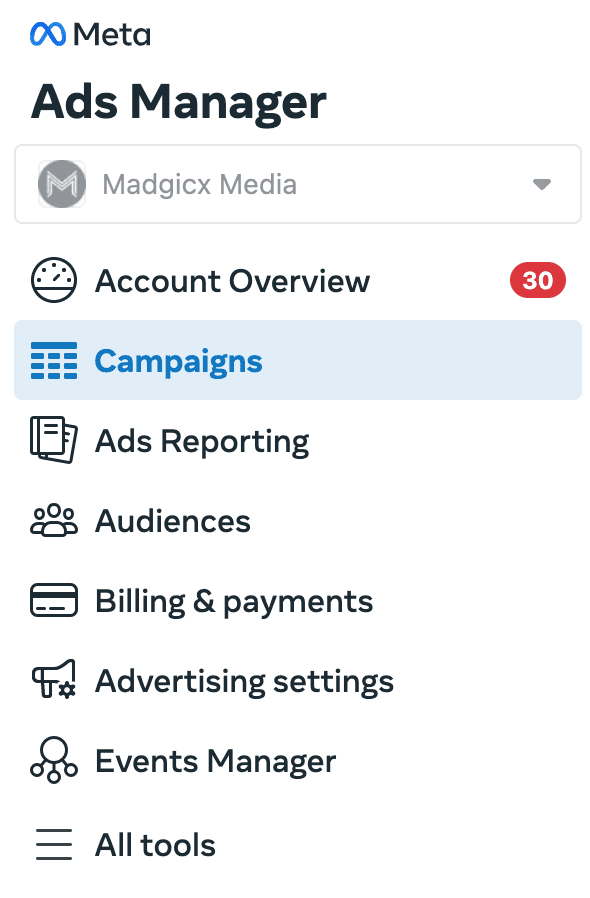
- Locate the ad set you want to work on. Click the ‘Edit’ button below the ad name.
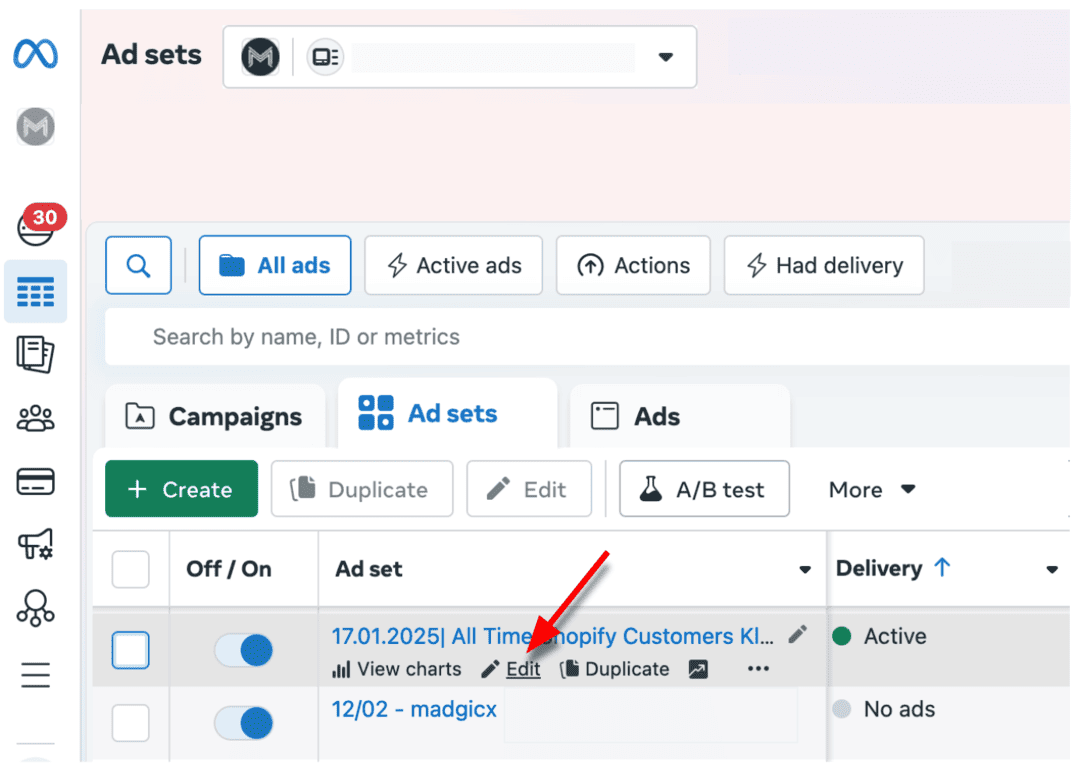
- The 'Placements' section is on the second page. Click 'Next' to access it.
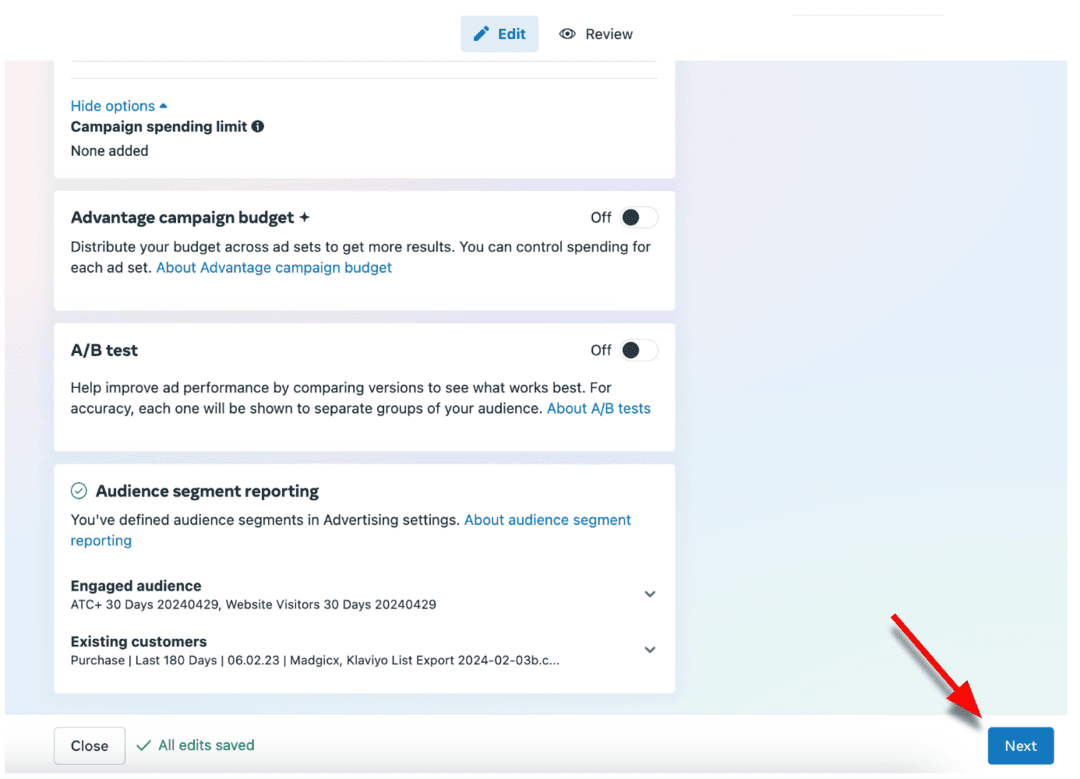
- If this update is available for your business, it will appear under ‘Inventory Filter.’ Choose the ‘No one’ option to turn off comments.
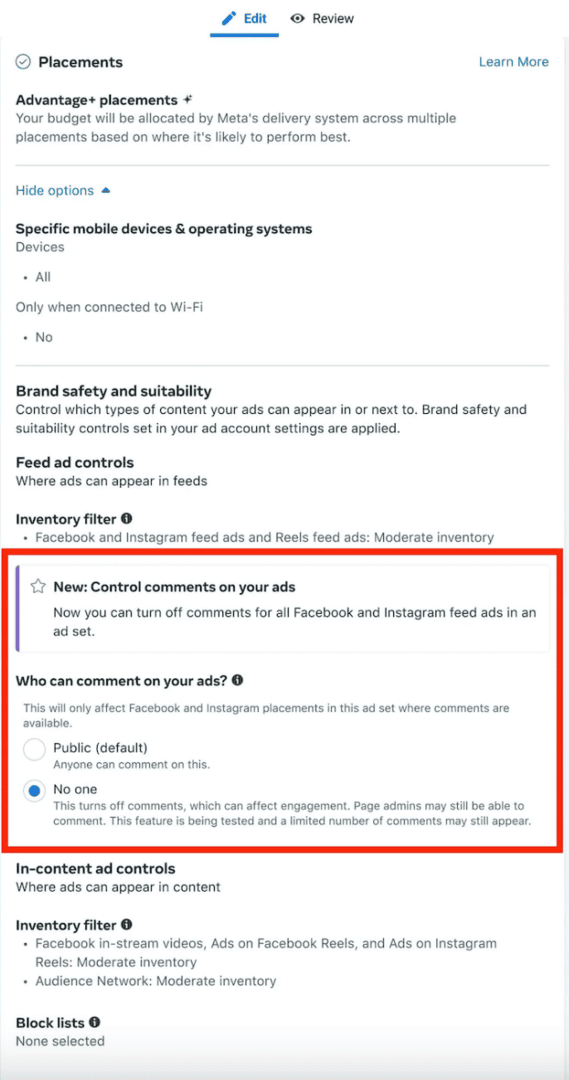
And boom! No more comments on those ads 🚫 Easy fix, right? But before you go all in on the silence, remember that comments aren’t just noise; they’re an opportunity. Leaving your comments open is a strategic business move that boosts engagement, builds trust, and helps your Facebook ads perform better.
But we’re also not going to pretend that managing all those comments isn’t a challenge. You’ll get genuine questions, glowing feedback, customer complaints, and spammy nonsense. Sifting through all of them manually? Time consuming. Hiring a full-time social media manager? Costly. Ignoring them? Even worse.
What to Do Instead of Turning Off Comments
If comments worry you, you do not have to switch them all off. You can hide a single comment so the public cannot see it, delete it, or block certain words so those comments are hidden for you. Reply quickly to real questions, because fast answers build trust. Hiding a comment is often safer than deleting it, because the person who wrote it is less likely to complain.
How to manage comments on Facebook ads with AI
If you would rather not turn off comments on Meta ads, you can manage them instead. That’s where AI technology can help you—specifically, Madgicx's AI Marketer.
The AI Marketer is your 24/7 genius sidekick, managing ad comments while also handling audience targeting, budget optimization, creative testing, and more.
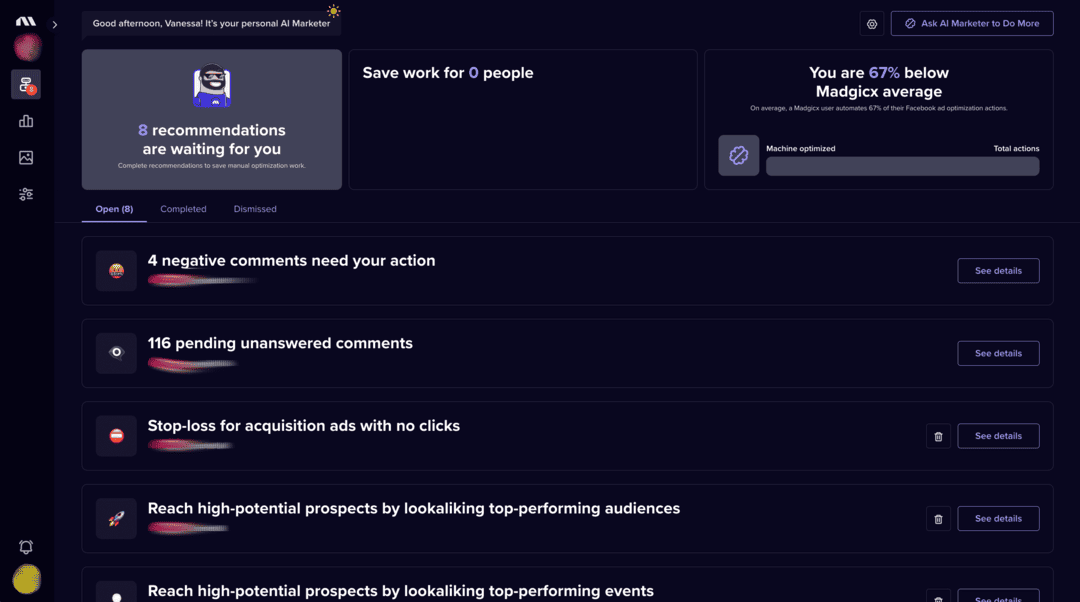
You get:
👉 Smart comment management - It analyzes your comments in real time, categorizing them into positive feedback, genuine questions, customer service issues, spam, or potentially harmful content. Then, it recommends the best course of action—whether that’s hiding and blocking a user, sending a response, or letting AI suggest a reply.
Since many comments are often similar, the AI saves you time by suggesting a tailored response based on past interactions, ensuring your replies are consistent with your brand’s voice while staying efficient.
👉 Budget optimization - It monitors your ad account 24/7, constantly auditing performance and providing data-driven optimization recommendations that help your ad budget work harder. From spotting underperforming ads before they waste your budget to identifying high-potential opportunities to scale, the AI Marketer keeps your ads at peak performance.
👉 Audience targeting - With AI-powered analysis, Madgicx's AI Marketer finds patterns in behavior, interests, and actions within your ad data. It pinpoints your best-performing audience groups and merges them into one highly focused ad set—helping you reach the right people while saving time and budget.
👉 Creative testing - Instead of guessing what works, Madgicx's AI Marketer evaluates your ad performance to determine the most effective creatives. It then spotlights high-performing creatives so you can scale successful ads.
Bonus: You can get this always-on AI agent for just $45/mo!
If you want to go deeper, read about a Facebook comment moderation tool, how ad comments moderation works, or how to take care of your Facebook ad comments with Ad Care.
Excited to give it a try? Get started FOR FREE today.
FAQ
How to see comments on Facebook ads?
To view comments on Facebook ads, follow these easy steps:
- Go to Meta Ads Manager.
- Find the specific ad campaign or ad set you want to check.
- Click on the ad name to open its preview.
- In the preview, look for the option to view the post with comments. It will show the ad as it appears to users and all the comments.