Madgicx vs Bïrch (Revealbot): The AI Alternative to Writing Rules
Bïrch, formerly Revealbot, automates your ads with rules you write and keep up to date. Madgicx's AI tells you what to do next, builds campaigns when you ask in a chat, and makes your ads too, in one plan from $45 a month. Below, compare a purchase-based pause rule in Madgicx, Bïrch and Meta Ads Manager.
Madgicx is the better fit when you want AI that recommends your next move, builds campaigns from a chat and makes your ads, with automation rules included from $45 a month.
See how we reached this recommendationMadgicx vs Bïrch, side by side
| Madgicx | Bïrch | |
|---|---|---|
| AI recommendations for your account |
A list of next steps for your account, which you approve or dismiss
|
Birch AI can review performance and suggest changes in a scheduled Routine
|
| Create campaigns, ad sets and ads from a chat |
Created paused, on your approval
|
Birch AI can create paused campaigns, ad sets and ads with Meta MCP connected
|
| Ask questions about your account |
Ask in the chat and get answers from your account data
|
Ask its AI chat about your account
|
| AI image ad generation |
From a prompt, your own ads or real ads you found
|
No AI ad generation
|
| Library of real ads for inspiration |
Browse ads and turn any of them into your own
|
Search from chat only
|
| Creative and copy analysis |
See which creatives and which lines of copy bring results
|
Preset reports on top and fatigued ads
|
| Ready-made and AI audiences |
Launch them in a few clicks
|
Custom and lookalike builder, Pro and Enterprise
|
| Meta account audit |
Targeting, demographics, geography and auction checks in one audit
|
Audits its own rules
|
| AI help with unanswered ad comments |
Finds comments that need an answer and generates replies
|
No AI help with comments
|
| Automation rules |
Ready-made and custom rules in every plan
|
Included with Pro and Enterprise
|
| Price with automation | $45/mo at up to $1,000 in monthly Meta spend | $99/mo (Pro) at up to $10,000 in total monthly spend across connected accounts |
Why Meta advertisers choose Madgicx over Bïrch
Recommendations instead of rule writing
Madgicx reviews your account and lists what to do next, such as pausing ads that lose money, answering pending comments or switching on an automation tactic. You approve or dismiss each one. Bïrch lets you write rules and schedule a performance review in Birch AI.
Campaigns built from a conversation
Tell the chat what you want to run. It asks for the objective, budget, targeting, creative and Page, then creates the campaign, ad set and ad, paused until you approve. Bïrch also documents campaign creation through Birch AI when Meta MCP is connected.
Your ads are made where you manage them
Generate image ads from a prompt, from your own best ads or from real ads in the library, with no limit on how many you make. Then see which creatives and which lines of copy bring results. Bïrch has no AI ad generation.
Audiences and audits are included
Launch prebuilt and AI audiences in a few clicks, audit your whole Meta account, from targeting and demographics to auction data, and get help replying to ad comments. All of it is in the same plan.
Which Facebook ads tools can pause an ad set based on CPA?
Meta Ads Manager, Bïrch and Madgicx all let you pause an ad set based on cost per acquisition (CPA). Here is the same decision in each tool. Suppose a purchase is worth up to $30 in acquisition cost and you want to allow $60 of spend before acting. Select one active sales ad set with its own budget and website purchases as its result. Use the same three-day reporting window, attribution setting and morning check in all three.
When purchases have come in. Pause if spend is greater than $60, purchases are at least one and cost per purchase is above $30. At $96 with three purchases, CPA is $32 and the rule pauses delivery. At $90 with three purchases, CPA is exactly $30 and delivery continues.
When there are zero purchases. CPA has no value yet. Create a second rule that pauses if spend is greater than $60 and website purchases are below one. At $64 with zero purchases it fires. At $60 it waits. Use thresholds that reflect your margins and the time customers usually take to buy.
Meta Ads Manager. Select the ad set and create two custom automated rules. Use Amount spent, Results and Cost per result for the first rule, and the spend and result count for the second. Check that Results refers to website purchases. Set the same date range and schedule. Start with Send notification only to see which ad sets match before switching to Turn off ad sets.
Bïrch. In Rules, choose the ad account and eligible ad sets. Use Pause with Spend, Website Purchases and Cost Per Website Purchase for the first rule. In the second, use only spend and purchase count. Join the conditions within each rule with AND. Its pause-rule walkthrough shows both the CPA and zero-purchase approaches. At up to $10,000 in combined monthly spend across connected accounts, Pro lists $99 on monthly billing and includes automated rules.
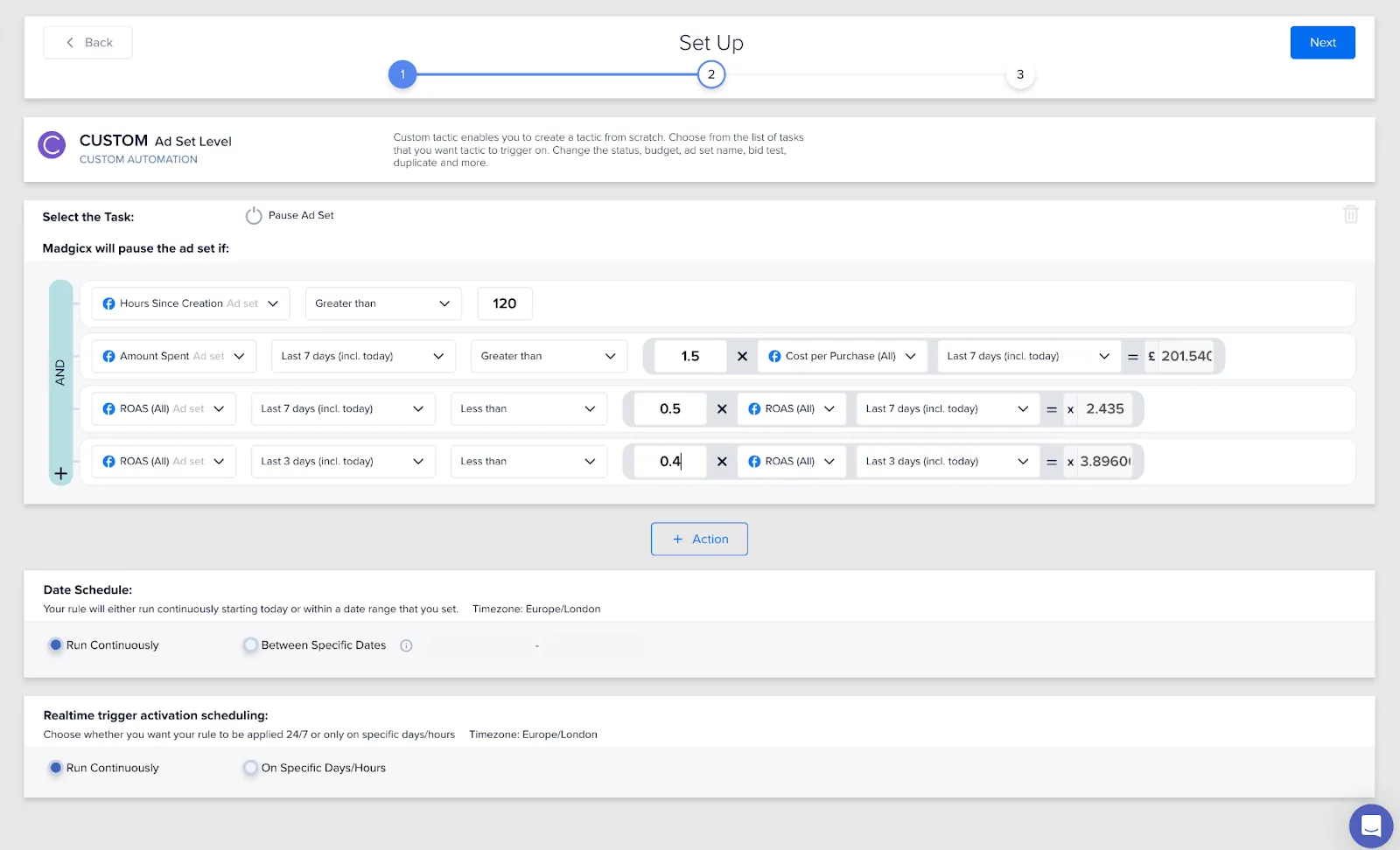
Madgicx. In Custom Automation, select the ad-set level and the same ad sets. Choose Pause, add the spend, purchase and cost-per-purchase triggers with AND, and set their reporting period and the days/hours schedule. Create the second automation with just spend and purchase count. Pause leaves the ad set off until someone restarts it. Pause for today restarts it the following day. Automation is included in Madgicx plans, which start at $45 per month for up to $1,000 in monthly Meta spend. If you spend exactly $10,000 a month and all of it is on Meta, monthly billing works out to $129 with Madgicx and $99 with Bïrch Pro.
Run the comparison on the same account data. If one tool counts a late purchase, recheck the reporting dates, account time zone and purchase attribution before acting. During the trial, let only one tool change delivery so you can trace each pause.
Evaluating other platforms too? See the Bïrch alternatives shortlist by workflow and price.
Rules or AI: what's the difference?
A rule does exactly what you told it in advance: if CPA rises above $40, pause the ad set. It can't tell you which ad set to test next, which creative to make or which comment needs an answer. And rules need updating as your account changes.
Madgicx keeps rules for the jobs that suit them and adds AI for the rest. Madgicx suggests the next step for your account, the chat builds what you ask for, and nothing the AI proposes changes your ads until you approve it.
One plan, everything included
Our verdict: choose Madgicx
If you advertise on Meta, choose Madgicx. You get recommendations instead of rule writing, campaigns built from a chat, AI image ads, video ads built from your own videos and ready-made audiences, with automation rules included from $45 a month. Try it free for 7 days alongside your Bïrch setup.
“I had been using Revealbot for 4 years when I decided to switch to Madgicx.When I found out about the platform, I first tried to compare it with the other options on the market. It just has so many more functionalities to offer for the price I’m paying, and it's far ahead of its competitors in terms of development.”
Sun Naritson, CEO & Founder, MSR Digital Partner
How we compare: methodology
- Everything a Meta advertiser needs in one plan: analysis, creative, automation and AI.
- How much work the AI takes off your team, and whether you approve every change.
- Total cost at your spend.
- How quickly a team can start.
Published by Madgicx, one of the products compared. We use each vendor's product pages, help centre and pricing, with review dates listed below. This comparison is our editorial judgment about fit for Meta advertisers, not independent test results. Capabilities marked as missing weren't found in Bïrch's public documentation and should be confirmed with Bïrch.
Frequently asked questions
Is Madgicx a good alternative to Bïrch?
Yes, for advertisers who focus on Meta. Madgicx recommends what to do next, builds campaigns from a chat, makes image ads, builds video ads from your own videos and includes automation rules, from $45 a month.
Is Bïrch the same as Revealbot?
Yes. Revealbot renamed itself Bïrch, and revealbot.com now redirects to bir.ch.
Does Madgicx have automation rules like Bïrch?
Yes. Ready-made and custom rules are in every plan, and Madgicx suggests which ones to switch on.
Can Madgicx create campaigns for me?
Yes. Describe the campaign in the chat and it creates the campaign, ad set and ad. They're created paused, and nothing changes until you approve.
How much does Madgicx cost?
From $45 a month, priced by Meta spend, with unlimited seats and a 7-day free trial.
Sources
- Bïrch pricing, reviewed 12 November 2026
- Meta Business Help Center: About actions for automated rules, reviewed 12 November 2026
- Meta Business Help Center: Available conditions for automated rules, reviewed 12 November 2026
- Bïrch Help Center: Pause type rules, reviewed 12 November 2026
- Bïrch Help Center: Getting Started with Routines, reviewed 12 November 2026
- Madgicx Academy: How Madgicx custom automation works, reviewed 12 November 2026
- Bïrch features, reviewed 16 October 2026
- Bïrch AI tools, reviewed 16 October 2026
- Bïrch help centre: features overview, reviewed 16 October 2026
- Bïrch help centre: Meta tools in Birch AI, reviewed 16 October 2026
- Revealbot is now Bïrch, reviewed 15 October 2026
- Madgicx pricing, reviewed 16 October 2026
- Madgicx on G2, reviewed 16 October 2026
